Triggered by your calendar
Google Calendar and macOS Calendar. The meeting arrives, the island offers. Otherwise, a global shortcut and you are recording.
Keeti is a macOS app that lives in your Mac's notch. It spots the meeting on your calendar, listens to the room, separates the voices and writes the notes: decisions, action items, open questions. No bot, no link to open. Just the room and you.
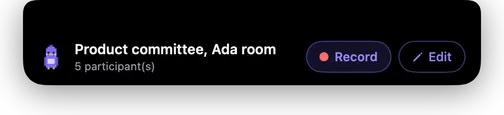
Keeti records the microphone in the room. It works in front of a screen too, but the gap we close is the one in the room: the place no bot can enter.
No window to manage, no extra tab. The island comes down when it has something to say, and goes back up when it is done.
Keeti reads your calendar (Google Calendar or macOS Calendar) and offers to record the event in progress. Otherwise a global shortcut is all it takes.
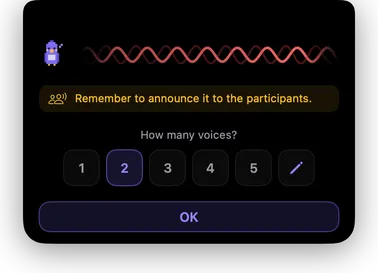
One question, one answer. That is what lets Keeti separate the speakers cleanly afterwards, and the consent reminder sits right where it belongs.
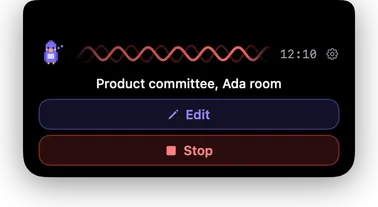
The timer, the waveform that proves sound is coming in, and two buttons. You can fix the attendees or the title without interrupting the recording.
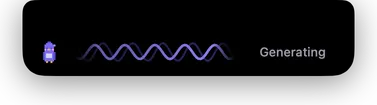
Transcription, speaker separation, writing. The island shrinks to a pill while it works, and you can go straight into the next meeting.
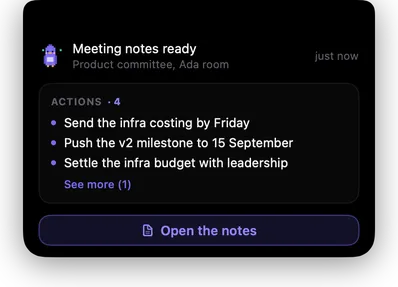
Decisions, action items with an owner, questions left open. One click to open them, and everything is already written to your folder, in open formats.
Keeti does not hand you an 8,000-word transcript. It hands you what was decided, who does what, and what is still open.
…yeah I mean I don't know, we said September but with the infra moving around… no hang on, Lea can you give us that figure again? … so if we push it it's the 15th, does that work for everyone? … ok fine let's go with that, Lea you send me the costing, and we need to settle the infra budget but not today…
Google Calendar and macOS Calendar. The meeting arrives, the island offers. Otherwise, a global shortcut and you are recording.
Speaker separation on the room's microphone. Teach Keeti your voice once, and it recognises you from then on.
Every action item has an owner and a due date. Fix whatever needs fixing, then export the lot.
Recording, transcription and speaker separation all run locally on your machine. To write the notes, Keeti calls the AI provider of your choice with your own key: only the text of the transcript is sent. Never the sound.
Every feature, no cap on meetings, no credit card. Pricing and billing will be announced when 1.0 ships.
Yes, as long as the sound comes out of your speakers or headset and the microphone picks it up. But Keeti is built for the room. Video calls are already well served by other tools; it is in-person meetings that have nothing. That is where our energy goes.
No, and that is rather the point. Keeti records the microphone of your Mac, sitting on the table. No extra attendee, no link to share, nothing for anyone else to install.
No. Recording, transcription and speaker separation all happen on your Mac, and the audio file never leaves it. To write the notes, Keeti sends the text of the transcript to the AI provider you picked, using the key you supplied. Your meetings never pass through us and we keep no copy: the exchange happens between your Mac and that provider. The only thing Keeti sends us is anonymous usage measurements, never content.
It separates the voices captured by the microphone and leans on the list of people present, usually pre-filled from your calendar. You can teach it your voice once so it recognises you from one meeting to the next, and you can fix an attribution afterwards: the notes are rewritten with the right names.
Only what it needs to prepare a meeting, and only if you connect it. Keeti reads your upcoming calendar events read-only, to pre-fill the title, the attendees and the number of speakers. It then turns attendee email addresses into full names through the Google People API, one address at a time, so the notes credit a person rather than an inbox. Keeti cannot create, edit or delete anything in your Google account, none of it reaches a server of ours, and each permission can be declined on its own. The detail is on the privacy page.
macOS 14 (Sonoma) or later, on an Apple Silicon Mac. On a Mac without a notch, or on an external display, the island appears as a floating bar at the top centre of the screen.
Yes. Recording a conversation is regulated, and the rules vary by country. Keeti reminds you when you start a recording, but making the announcement is your responsibility. One sentence at the top of the meeting is usually enough.
Free during the public beta. No account, no card, no bot around the table.